This version update fixes the bug that JoyBidder keeps refreshing BuyItNow item status when and after the listing is ended.
The update is available for both Pro and Free.
You can see JoyBidder Pro release notes here.
For the time being, the version update is only available through auto-update from the current and older version of JoyBidder until the Windows installer and Mac OS X disk image of the new version are published.

Thursday, March 21, 2013

Wednesday, March 20, 2013
CRITICAL BUG FIX: Update to version 1.9.12 NOW!
Latest update 1.9.12 is available for JoyBidder Pro and JoyBidder Free. It fixed a critical bug that both auction and fix price items cannot be added or updated in JoyBidder eBay Auction Sniper due to changes eBay made during last night. The fix was released within 8 hours when the issue was first reported. Existing users should upgrade to 1.9.12 as soon as possible. If you don't want to wait for the scheduled auto-update alert, you can upgrade manually.
Please be aware:
1. If you are using the Free version for Firefox, due to the Mozilla's rigid review process, the new version will be reviewed by AMO reviewers before it can be made public. (it could take 5 to 7 days).
If you don't want to wait, you can download from here, but it is outside AMO and cannot be auto-updated as the other AMO hosted extensions. You can later uninstall and re-install from AMO when the new version is published in AMO.
2. Windows installer and Mac OS X disk image won't be available in download.com or macupdate.com yet, so new users will have to download the older version and then immediately upgrade to 1.9.12
3. The fix is released ASAP with minimum regression tests. Please contact us and report bugs immediately if you find any. Thanks
Please be aware:
1. If you are using the Free version for Firefox, due to the Mozilla's rigid review process, the new version will be reviewed by AMO reviewers before it can be made public. (it could take 5 to 7 days).
If you don't want to wait, you can download from here, but it is outside AMO and cannot be auto-updated as the other AMO hosted extensions. You can later uninstall and re-install from AMO when the new version is published in AMO.
2. Windows installer and Mac OS X disk image won't be available in download.com or macupdate.com yet, so new users will have to download the older version and then immediately upgrade to 1.9.12
3. The fix is released ASAP with minimum regression tests. Please contact us and report bugs immediately if you find any. Thanks
Monday, February 4, 2013
View your license information online
I have to answer two questions from JoyBidder Pro users quite often.
To relieve the buyer's frustration from both of these scenarios, registered JoyBidder Pro users can now view the license information online easily, so they don't need to wait for my answer from email.
A View License Information link is added to the JoyBidder Pro eBay Auction Sniper Purchase page, which will alow registered JoyBidder Pro users to view registration code and expiration date of the current license. PayPal account email address of the latest PayPal transaction is required to retrieve the corresponding license information. Remember, please allow for up-to 1 business day, usually much sooner, for the payment to be processed and license information updated.

- Question 1: Why I don't receive registration code email after my purchase?
The problem is mostly caused by buyer's email server failure and user's email spam filter setting, which is a separate topic I will talk about later.
- Question 2: My computer crashed and I re-install the OS and JoyBidder, but what is my registration code?
To relieve the buyer's frustration from both of these scenarios, registered JoyBidder Pro users can now view the license information online easily, so they don't need to wait for my answer from email.
A View License Information link is added to the JoyBidder Pro eBay Auction Sniper Purchase page, which will alow registered JoyBidder Pro users to view registration code and expiration date of the current license. PayPal account email address of the latest PayPal transaction is required to retrieve the corresponding license information. Remember, please allow for up-to 1 business day, usually much sooner, for the payment to be processed and license information updated.

Sunday, October 14, 2012
Version Update Fails on Mac OS X [fixed]
Some of Mac users cannot upgrade to the latest version. The problem affect both Pro and Free edition. We are aware of the issue and is working on the fix.
At this moment, we are building and testing the Mac installation image for the latest version 1.9.6 for Pro and Free edition. We will make them available as soon as ready.
One workaround is to downgrade to the 1.8.1 and then upgrade.
JoyBidder eBay Auction Sniper Pro 1.8.1 for Mac
JoyBidder eBay Auction Sniper Free 1.8.1 for Mac
Sorry for the trouble, but please make sure to upgrade to 1.9.6 as soon as you can.
At this moment, we are building and testing the Mac installation image for the latest version 1.9.6 for Pro and Free edition. We will make them available as soon as ready.
One workaround is to downgrade to the 1.8.1 and then upgrade.
JoyBidder eBay Auction Sniper Pro 1.8.1 for Mac
JoyBidder eBay Auction Sniper Free 1.8.1 for Mac
Sorry for the trouble, but please make sure to upgrade to 1.9.6 as soon as you can.
Monday, October 1, 2012
JoyBidder Pro for Mac OS X 10.8 Mountain Lion (or sort of)

The problem appears to be caused by tightened security measure from the latest Mac OS X 10.8 upgrade. We are currently working on the fix, but, no eta yet, and from the look of it, the fix could take some days or even weeks to get ready), in the mean time, you can still run JoyBidder Pro as a Firefox Addon, that is, if you don't mind install Firefox on your Mac.
Once you have installed Firefox from http://www.mozilla.org, go to http://www.joybidder.com and click the "Firefox Extension" button.
JoyBidder Addon for Firefox works exactly the same as standalone desktop application. However, you need to re-config your eBay User Id and re-populate your item list, because addon and application don't share data.
Monday, February 27, 2012
CRITICAL BUG FIX: Update to version 1.8.1 NOW!
Latest update 1.8.1 is available for Pro and Free. It fixed a critical bug that auction items cannot be added or updated to JoyBidder due to changes eBay made during the last night. The fix was released within 5 hours when the issue was first reported. Existing users should upgrade to 1.8.1 as soon as possible. If you don't want to wait for the scheduled auto-update alert, you can upgrade manually.
Note: If you are using the Free version for Firefox, due to the Mozilla's rigid review process, the new version will be reviewed by AMO reviewers before it can be made public. (it could take 5 to 7 days).
Note: If you are using the Free version for Firefox, due to the Mozilla's rigid review process, the new version will be reviewed by AMO reviewers before it can be made public. (it could take 5 to 7 days).
Thursday, November 24, 2011
enable eBay Price alert in JoyBidder
I have blogged about using JoyBidder Pro to monitor Buy It Now items price drop on eBay. Here is a simple guide to set up price alert and receive email when price changes.
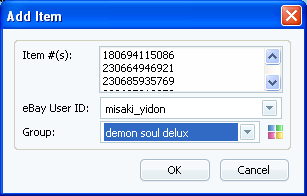
Step 1: Add the items to JoyBidder. One of the many ways to do this to add the items using the item numbers.
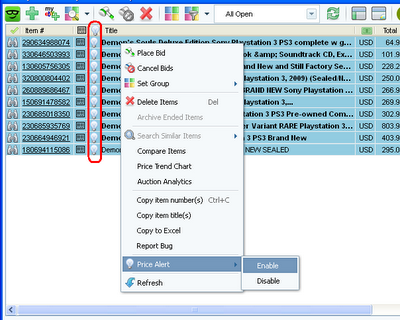
Step 2: Select the items and right click the mouse button to bring up the popup menu, and enable the Price Alert.
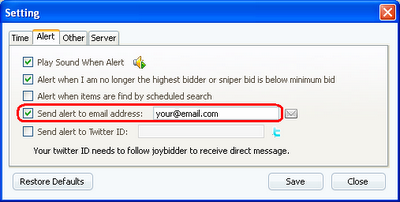
Step 3: Open the settings dialog and make sure you enable email alerts
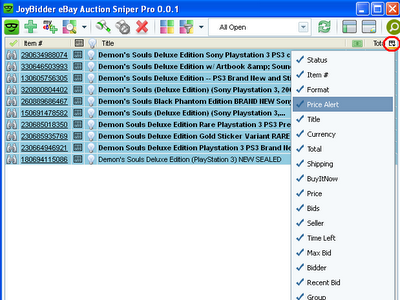
Step 4: Show the Price Alert column in the list, which displays up or down arrow if there is any price changes for the items.
Step 1: Add the items to JoyBidder. One of the many ways to do this to add the items using the item numbers.

Step 2: Select the items and right click the mouse button to bring up the popup menu, and enable the Price Alert.

Step 3: Open the settings dialog and make sure you enable email alerts

Step 4: Show the Price Alert column in the list, which displays up or down arrow if there is any price changes for the items.

Subscribe to:
Posts (Atom)